Modern Collage Cutout Set: Everything You Need for Creative Projects
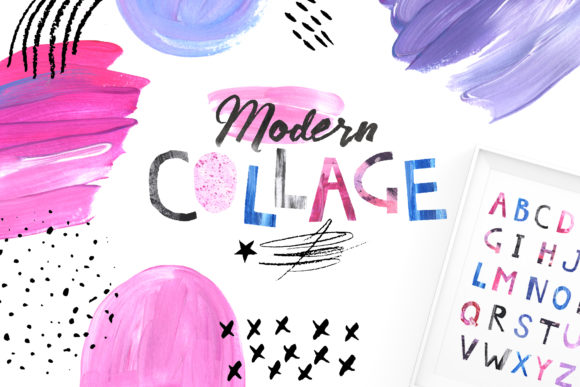
Whether you're designing social media content, creating a unique greeting card, or working on a digital magazine layout, the Modern Collage Cutout Set offers a versatile collection of handcrafted elements to elevate your work. This set is designed for creators who value authenticity and artistic flair in their projects. With over 150 elements like paper tears, cutout shapes, doodles, brush strokes, splatters, and more, it’s an essential tool for anyone looking to add texture and charm to their designs.
The Modern Collage Cutout Set includes everything you need to bring your creative vision to life. Each piece has been painted with acrylics and drawn with crayons on paper, then carefully hand-cut, scanned at high resolution, and extracted to preserve the natural edges and authentic feel of real paper bits. These elements are perfect for those who love to create whimsical collages, e-newsletters, web banners, quotes, posters, invitations, greeting cards, business cards, art, illustration, day planners, desktop wallpapers, clipart, stickers, scrapbooking, textiles, and more.
What's Inside the Modern Collage Cutout Set
Let’s take a closer look at what comes included in this comprehensive set:
- Doodle Elements Set: 29 transparent PNG doodle elements in sizes of approximately 4000×4000 px and 2500×2500 px.
- Paper Cut Alphabet: 26 transparent PNG letters, each measuring 1000×1000 px.
- Paper Collage Shapes: 62 cutout paper shapes in transparent PNG format, sized around 2000×500 px.
- Acrylic Paint Strokes: 15 transparent PNG elements and 20 JPG seamless patterns in various dimensions including 1200x2700px and 2200x2400px.
- Collage Poster Template: 12 pre-made JPG prints, each measuring 4000x4000px.
This wide variety of elements gives you the freedom to mix and match to suit your project needs. The high-resolution scans ensure that every detail remains crisp and clear, making these assets ideal for both print and digital use.
Common Mistakes When Using the Modern Collage Cutout Set
While the Modern Collage Cutout Set is incredibly versatile, there are some common mistakes that can affect the final outcome of your design. One of the most frequent errors is not checking the file formats before starting a project. Although the set includes PNG and JPG files, it's important to confirm which format your design software supports. For example, if you're using Adobe Illustrator, PNG files may be better suited for transparency, while JPG is ideal for seamless patterns.
Another mistake is underutilizing the range of elements provided. Many users tend to stick with just a few favorites, missing out on the full potential of the set. It's worth experimenting with different combinations of doodles, alphabet letters, and paint strokes to discover new ways to enhance your designs.
A third error is neglecting to scale elements properly. Because the pieces vary in size, resizing them without maintaining their quality can lead to blurry or pixelated results. Always make sure to scale images proportionally within your design software and avoid stretching them beyond their original dimensions.
How to Avoid These Mistakes
To get the best results from the Modern Collage Cutout Set, start by organizing your elements into categories based on their use—doodles, letters, shapes, and textures. This will help streamline your workflow and reduce the time spent searching for the right element.
Before beginning a project, double-check the supported file formats in your design software. If you're using Canva or Picmonkey, for instance, PNG files are often preferred for their transparency features. In contrast, Photoshop and Illustrator offer more flexibility with both PNG and JPG formats.
When scaling elements, always use the transform tools in your design software rather than manually resizing them. This ensures that the image quality remains intact and that the proportions stay consistent. Additionally, consider using layers to keep your design organized and editable, especially when combining multiple elements in one composition.
Realistic Examples and Better Approaches
Imagine you're creating a social media banner for a boutique store. Instead of using generic stock images, you could incorporate the Modern Collage Cutout Set to add a personal touch. Use the paper tear elements along the edges, sprinkle some acrylic paint strokes in the background, and place the store name using the cutout alphabet letters. This approach not only makes the banner stand out but also reinforces the brand’s handmade aesthetic.
If you're designing a greeting card, try layering different doodle elements with cutout shapes to create depth and visual interest. For example, place a doodle of a sun behind a cutout heart shape, and add a few splatter elements to give it a playful feel. This method allows you to craft something unique without relying on standard templates.
Another practical application is using the collage poster templates as a base for your design. These pre-made prints can serve as a foundation, allowing you to customize them with additional elements from the set. This is particularly useful for beginners who want to experiment with layout and composition before moving on to more complex projects.
What to Check Before Using the Set
Before diving into your next project, take a moment to review the following details:
- Ensure your design software supports the file formats used in the set (PNG and JPG).
- Check the resolution of each element to confirm they meet your project requirements.
- Review the licensing terms to understand how you can use the graphics commercially or for personal projects.
- Look for any updates or additional resources provided by the creator, such as tutorials or tips for using the elements effectively.
By taking these steps, you'll be well-prepared to make the most of the Modern Collage Cutout Set and achieve professional-quality results.
Remember, the key to success with this set lies in experimentation and attention to detail. Don’t be afraid to mix and match elements in unexpected ways. With the right approach, you’ll be able to create stunning visuals that reflect your unique style and creativity.